VST3 / Standalone · Windows / macOS (Apple Silicon) · One-time purchase or subscription
Chord progression VST3 plugin · Chord Craft VST Never get stuck on
the next chord again.
Just follow a map of progressions where similar sounds sit side by side. Click any progression to hear it, then drag it onto your track as MIDI. Time spent stuck becomes time spent writing.
Try the free browser version, ChordCraft, first →
- 500+
- RHYTHM PATTERNS
- 23
- GENRES OF STANDARDS
- ∞
- FREE-FORM GROOVE
WHAT YOU GET
From a spark of an idea straight into a song.
EXPLORE
Reach beyond your usual habits.
Similar-sounding progressions sit next to each other like places on a map, so you can try the chord one step away from your usual choice without hesitation.
FEEL
Capture the vibe of the songs you love.
Browse the standard progressions of each genre, listen, and pick. Get to the sound you're after by the shortest route.
GROOVE
Programmed parts that feel played.
Turn a few knobs for swing, feel and dynamics, and a mechanical backing part starts to breathe.
SHIP
Put it on a track the moment it clicks.
Drag the progression you like straight into your DAW as MIDI. Time spent stuck becomes time spent writing.
EXPLORER
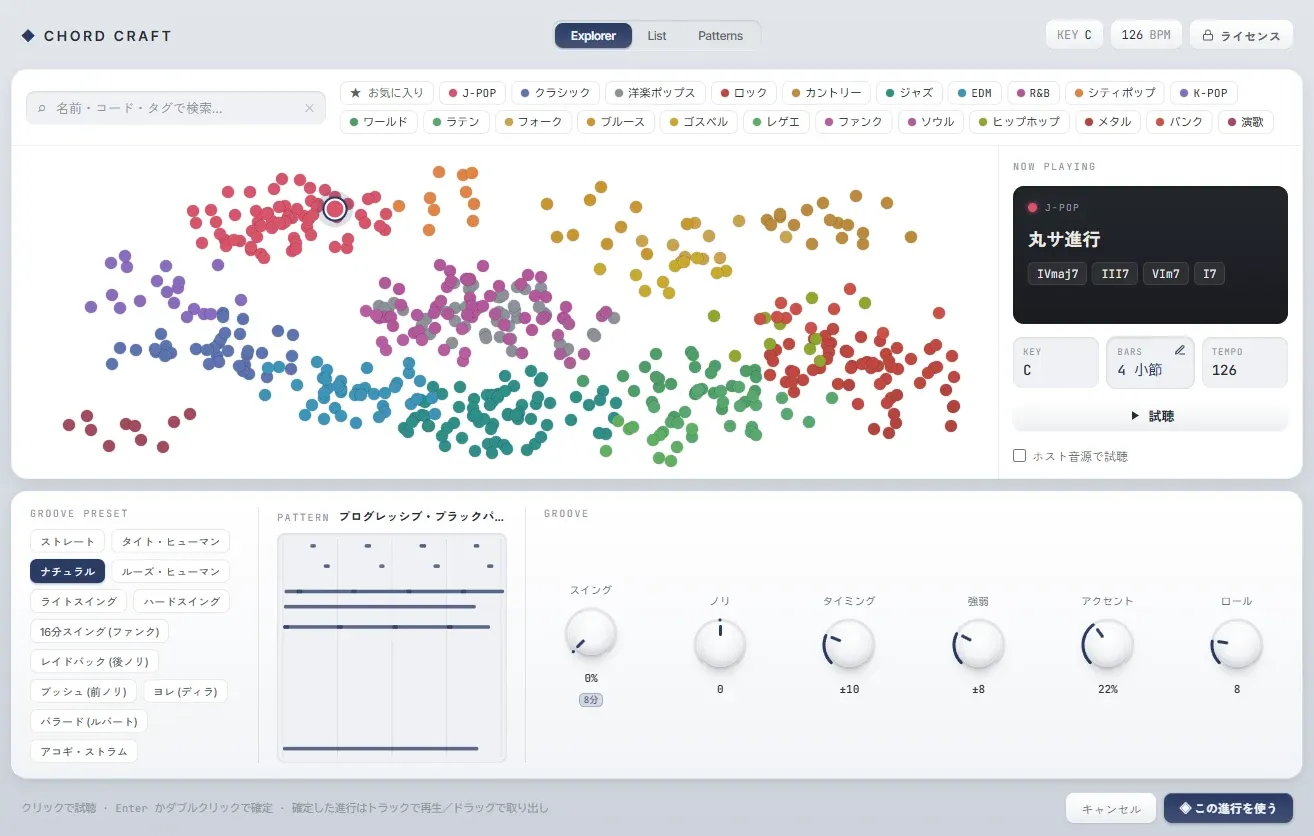
Similar-sounding chord progressions,
right next to each other.
A map that places progressions by how close they sound. Move a little from where you are and you'll find a new idea without breaking the mood. Colour shows the genre, distance shows similarity. Follow your ears from star to star.
23 GENRES · SOME OF THEM
IV – III – vi – I · KEY C
The closer they are, the more alike they sound. Move a little from where you are to find your next idea.
500+ PATTERNS
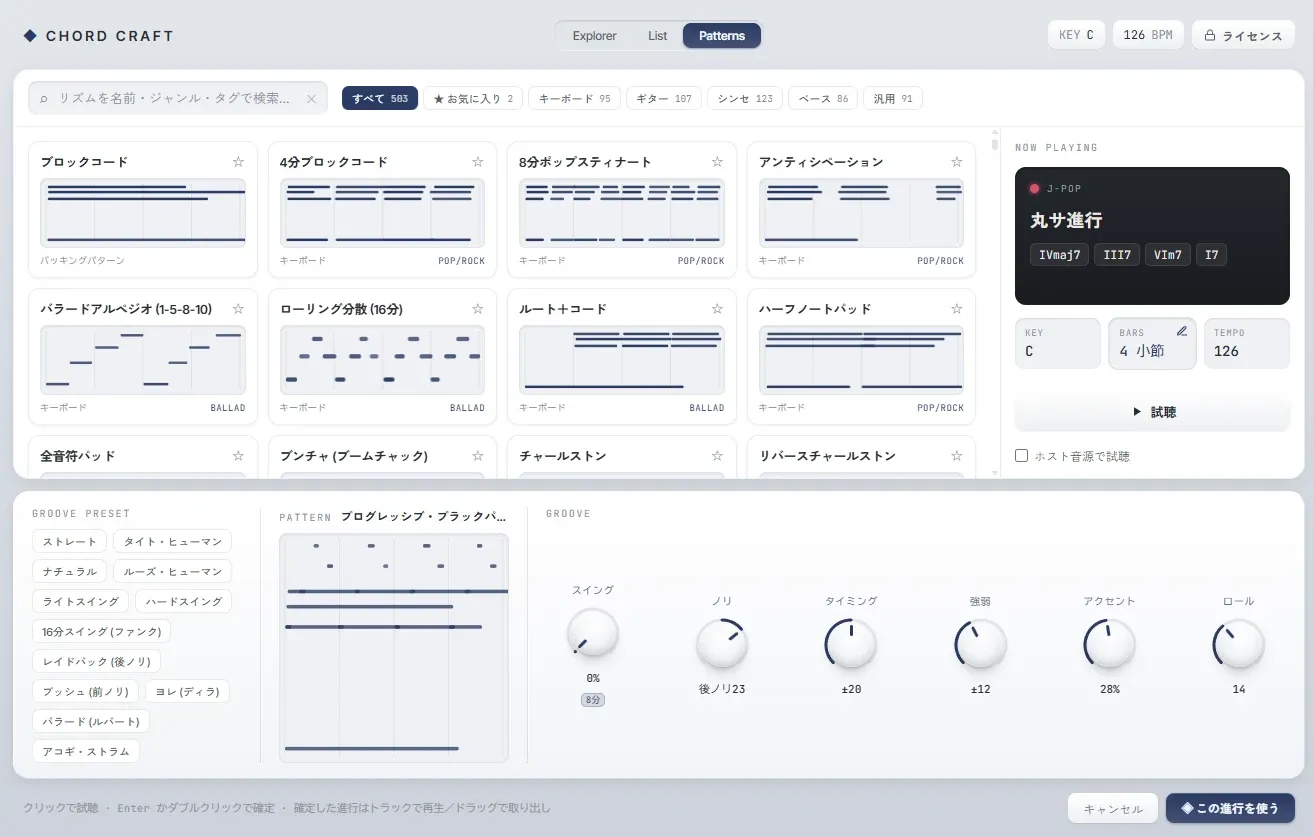
Pick from 500+ rhythm patterns,
then drag it out as MIDI.
No more wondering what to do for the backing. Block chords, arpeggios, strums, bass lines — over 500 rhythm patterns for keys, guitar, synth and bass are built in. Apply one to your progression and an empty track comes alive.
- ◆ Covers keys / guitar / synth / bass
- ◆ Quick search by name, genre and tag
- ◆ Favourite the patterns you use most
GROOVE
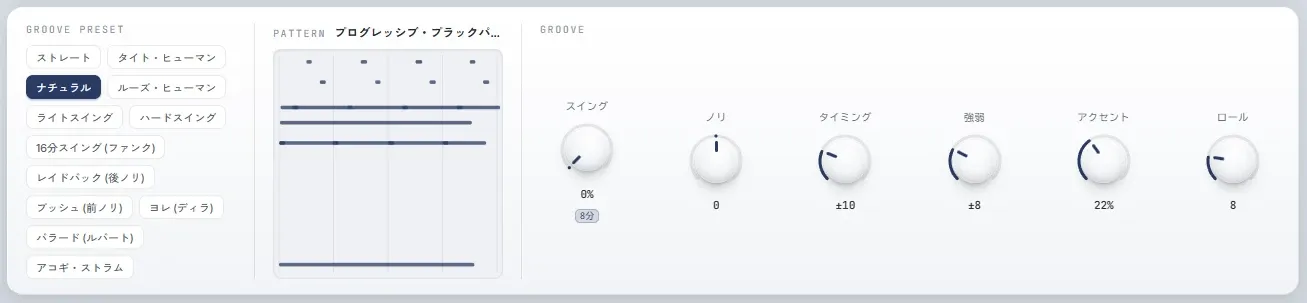
One turn of a knob.
Your programming comes alive.
Swing, feel (pushing or laying back), timing variation, dynamics, accent and roll. A small turn of six knobs gives notes stuck to the grid the warmth of a human hand. Start from a preset and fine-tune only what you want.
FROM STUCK TO WRITING
Keep your next move coming.
My chord theory is shaky. But I can pick a progression that sounds like that song by ear, so I keep moving even without the knowledge.
My loops kept sounding alike. Just peeking at the sounds next door widened my palette a lot.
When a brief asks for 'that kind of mood', the genre map gives me an instant answer. My sketches got faster.
* Examples based on the kinds of people we expect to use it, not actual reviews.
REQUIREMENTS
System requirements
Please check that it works in your setup before buying.
| Format | VST3 instrument / standalone app |
|---|---|
| Windows | 64-bit (x64). The UI uses the WebView2 runtime (the installer installs it when missing). |
| macOS | Apple Silicon (M-series) only. Intel Macs are not supported. |
| DAWs with setup steps | Cubase / Ableton Live (explained with screenshots in the setup guide). It is meant for any DAW that can load VST3 instruments, but we don't publish steps for others. |
| Not supported | No AU or AAX versions. It can't be loaded in Logic Pro or GarageBand (AU) or Pro Tools (AAX). |
| License | Up to 3 machines at the same time per license. The first activation needs an internet connection (after that it works offline for a period of time). |
PRICING
Start the way that suits you.
Both plans have the same features. Only how you pay differs.
If you can't find it, please also check your spam folder.
One-time purchase
¥3,500
Pay once, use it forever
- ◆ Pay once and it's yours for good
- ◆ No monthly fee — the longer you use it, the better the value
- ◆ Up to 3 machines · works offline
Subscription
¥980/month
Monthly, cancel anytime
- ◆ Good for trying it out · cancel anytime
- ◆ Up to 3 machines · works offline
Prices are in Japanese yen (JPY). The final amount is shown on the Stripe checkout page.
You can cancel a subscription or request a refund from the account page (Japanese).
Before buying, please read the terms of use · legal notice (SCTA) · privacy policy (all in Japanese).
FAQ
FAQ
Does it work on both Windows and Mac?
Yes. It supports Windows (64-bit) and macOS; the macOS version is for Apple Silicon only. On both systems you get the VST3 plugin and the standalone app, and one license can be activated regardless of OS.
Can I use it standalone or as a VST3?
Both. Try ideas in the standalone app without opening a DAW, or load it as a VST3 plugin in your DAW and use it as part of your workflow. It works the same on Windows and Mac.
Does it work in Logic Pro or GarageBand?
No. Chord Craft comes as a VST3 plugin and a standalone app; there is no AU version, which Logic Pro and GarageBand require. For the same reason it doesn't work in Pro Tools, which only supports AAX.
Does it run on Intel Macs?
No. The macOS version is for Apple Silicon (M-series) only.
Can I use it without knowing music theory?
Yes. You don't need to know chord names or degrees — just listen and pick the progression that sounds good to you. Explorer places similar sounds close together, so you can search by ear alone.
Can I use the progressions in my DAW?
Drag the committed progression from "Drag MIDI" onto a track and it is placed as MIDI (.mid). The setup guide covers the steps for Cubase and Ableton Live.
Can I try it before buying?
You can install it and check that it loads in your DAW before buying, but the features unlock only after you activate a license (there is no trial version). You can try exploring chord progressions first in the free browser version, ChordCraft (chord.iru-yo.com).
What's the difference between the one-time purchase and the subscription?
The one-time purchase lets you use it forever after a single payment. The subscription is monthly and can be cancelled anytime. Both have the same features.
How many devices can I use it on?
Up to 3 machines of the same user at the same time. When you replace a computer, deactivate the old machine and move the license.
Does it work offline?
Once activated online, it keeps working offline for a period of time — in the studio, a café or anywhere without a connection.
Can I get a refund?
Please contact us about technical problems within 14 days of purchase. Refund requests for both the one-time purchase and the subscription are accepted through the refund form (in Japanese). If you only want to cancel a subscription (stop future charges), you can do it yourself in the customer portal on the account page.
STANDALONE · VST3 · WINDOWS / MAC
Turn time spent stuck
into time spent writing.
Your next move is already on the map. Bring it into your music today.